dynamic-island

DYNAMIC ISLAND

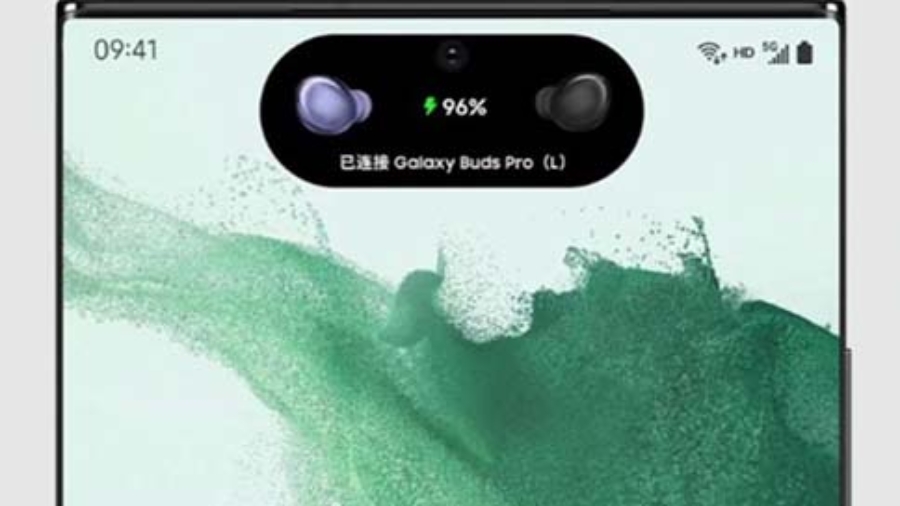
With dynamicSpot you can easily get the iPhone 14 Pro’s Dynamic Island feature on your android device!

dynamicSpot gives you Dynamic Island mini multitasking feature, making it easier to access recent notifications or phone status changes.

Just tap on the little black dynamic spot / popup to open the displayed app, long press the popup to expand it and view more details.

iPhone’s Dynamic Island is not customizable, but dynamicSpot is! You can change interaction settings, select when to show or hide the dynamic spot / popup or which apps should appear.

As dynamicSpot uses Android’s notification system it is compatible with almost all apps, like messaging notification, timer apps and even music apps!

MAIN FEATURES
• iPhone 14 Pro Dynamic Island feature
• dynamic multitasking spot / popup
• Support for timer apps
• Support for music apps
• Customizable interaction

MUSIC CONTROLS
• Play / Pause
• Next / Prev
• Touchable seekbar

SPECIAL EVENTS
• Timer aps: Show running timer
• Battery: Show percentage
• Maps: Show distance
• Music apps: Music controls
• More to come soon!

CALCULATOR

CALCULATOR LOCK

Use the best calculator photo vault to hide photos, hide pictures, hide videos.

Calculator Photo Vault is the Vault app can secretly Hide Photos, Hide Videos and other files without anyone knowing as gallery lock installed in your phone looks as just a beautiful calculator, and works very well. Your files will be secretly stored in vault and can only be viewed after a Numeric PIN is entered on calculator panel of this app.

Top Features:

Vault: Through the AES encryption algorithm, encrypt the content that you do not want to share with others, and the file format, size without any restrictions, but also support taking pictures and recording videos.

Browser: An inbuilt private browser for your safe browsing of private websites and downloading of photos from web and lock instantly inside photo vault and leaves no tracks in your system.

Shake Close: Shake the phone can quickly close the app, so that everything in your control.

Intruder Selfie: Automatically takes Intruder selfie when someone tries to break in your privacy by entering wrong password.

Fake Vault: Create Fake vault with different password for storing fake photos and videos.

Fingerprint Unlock: To provide you with a faster, more secure way to unlock.

Colorful Theme: A variety of fashionable colors, any match, to create your exclusive theme.

Calculator: Offers all the regular and scientific calculator functions in a simple, stylish and easy to use.

app drop

AppDrop

About this app

AppDrop is your one stop shop for uninstalling batches of apps in one go.

If you’re someone who has a lot of unnecessary apps taking up valuable space on your phone, then AppDrop is the tool for you!

Gone are the days of having to sift through your app drawer to uninstall several apps in a row, which takes far too many clicks and taps. Instead, let AppDrop do all the heavy lifting for you. Simply tap and select as many apps as you like, hit uninstall and away you go!

You can sort your apps by size, view your apps in grid view, search across all the apps on your phone and even quickly view any apps uninstalled via AppDrop. And even better yet, the doesn’t require root access or request any permissions.

AppDrop has a beautiful design, with eye-catching animations throughout, and it even has an elegant dark mode, to save your eyes at night.

In addition, if you upgrade to AppDrop Premium, then you’ll gain access to extract app APKs directly to your phone’s local storage.

turbo

VPN

About this app

Turbo VPN – The most secure Android VPN! Improve your online browsing, gaming and communication experience!
No matter you are in office, school, home or any public place, Turbo VPN can secure your online activities and help you enjoy the web, app and game resources with ease, privacy and high speed.

Turbo VPN – The most secure VPN
– Turbo VPN protects your network under WiFi hotspot or any network condition.
– Multiple protocols like IPsec, ISSR, SSR, OpenVPN (UDP / TCP) to ensure your network connection and mask your online identity.
– Military-grade AES 128-bit encryption to guard your sensitive data wherever you are.

Access web with super fast Turbo VPN
– Access the web resources, social network, videos, forum, news, shopping websites, apps or online banking services at stable and super fast speed under security protections of Turbo vpn.
– No worry about the unvailable access problem, because when the network condition is unsatisfying, you can connect to Turbo VPN free vpn proxy server or dedicated premium server to optimize the network.

Free VPN servers and dedicated premium servers all over the world
– Turbo VPN helps you connect to the server location of America, Canada, Malaysia, India, UAE, Singapore, UK, France, German, Spain, Russia, Australia, etc.
– Dedicated servers for games and videos can optimize your network to watch the videos on different platforms smoothly and play mobile game of different regions.

Unlimited free VPN app:
All Android users can connect to free VPN proxy servers for free and enjoy the free VPN servers without time or speed limitation.

Easy-to-use VPN
One tap to connect to the free VPN proxy server. Turbo VPN works with WiFi, LTE, 3G, and all mobile data carriers and is compatible with all kinds of browsers.

Download the secure, fast and free Turbo VPN! Secure your online activities and enjoy the web and app resources with ease, freedom and security now!

User Terms:
By downloading and/or using this product, you acknowledge and agree to the end user license agreement and Privacy Statement at:
https://www.turbovpn.co/static/privacy_policy_turbovpn.html

Our 24/7 customer support team is always here with you. Contact us If you have any queries: [email protected]

screenshot

Virtual Android

About this app

Virtual Android is an independent virtual operating system for your Android device. Double the power of your Android device and run entire copies of your operating system simultaneously – achieve faster performance, multiple accounts, protect your privacy, and enjoy more fun on one device.

Virtual Android creates a virtual partition on your mobile device and runs a copy of Android in each parallel space. It’s just like using two separate mobile phones! When using this virtual machine for Android, you can switch between the local system and the virtual system with one tap and access multiple accounts simultaneously. Games and apps in the emulator’s parallel environment can easily run in the background, allowing for seamless switching between virtual copies of your device.

【Easy, free-to-use Virtual Android Environment】
Similar to a free cloud phone, but even more powerful! We support almost all social apps and games, meaning you can have dual WhatsApp, Sharechat, Snapchat, FreeFire, and many other apps with the push of a button. Sign in to different accounts on one device and switch between them with just one tap, receive messages and notifications from all of your signed-in accounts and bounce between them effortlessly.

【Independent virtual GPU ensures multiple copies perform seamlessly】
Virtual Android supports an independent virtual GPU. Why does this matter? It’s what sets us apart from other virtual and clone apps! Each copy of Android running on your device has a dedicated virtual GPU, meaning games and apps run flawlessly in the background. You can play two FreeFire matches simultaneously, and copies of the game running in the background won’t pay the price if you have an incoming call or other business to attend to on your device. Just like bringing the emulators such as Bluestacks and Nox to your phone. Enjoy premium graphics in your cloned apps that our competitors can’t beat!

【Enjoy multiple copies of an app online simultaneously】
Games and Apps are cloned after being imported into Virtual Android, which means that you can run multiple accounts simultaneously on one device via our high speed virtual system. Use our virtual environment to your advantage and enjoy dual copies of your favorite instant messenger apps at the same time, or parallel copies of your favorite game to double your experience. We support it all!

FAQ from the developer:

1. How much disk space does Virtual Android need?
Virtual Android runs a whole new android 7 system. It needs to download about 600MB rom data and requires about 2.5GB disk space to run. It will use more disk space if apps are installed or upgraded.

2.Can Virtual Android be installed in multi-user?
Some apps are not supported if Virtual Android isn’t installed in the device owner or administrator.

3. What to do if there is a download issue?
We depend on Google’s AAB server to distribute rom data. Please restart when stuck. If restarting doesn’t work, please update your host machine’s Google Mobile Services components and reinstall Virtual Android with sufficient disk space.

4.What to do if Virtual Android can’t boot?
In most cases, some system file is damaged. Please ensure you have enough disk space and reboot. If rebooting doesn’t work, please reinstall Virtual Android. If reinstallation doesn’t work or you don’t want to reinstall, please wait for a new release.

5.What to do if there is a network issue in Virtual Android?
Please try to change the DNS to an available address, such as 8.8.8.8, in the Advanced Setting.  It can solve some network issues.

screenshot

SD Main

About this App

A maid for your Android, to keep it clean & tidy.

SD Maid will help you keep your device clean and tidy!
It offers a collection of tools to manage apps and files.

Nobody is perfect and neither is Android.
Apps you have already removed leave something behind.
Logs, crash reports and other files you don’t really want are constantly being created.
Your storage is collecting files and directories you don’t recognize.
Let’s not go on here… Let SD Maid help you!

SD Maid allows you to:

  • Browse your whole device and manipulate files through a full-fledged file explorer.
  • Remove superfluous files from your system.
  • Manage installed user and system apps.
  • Detect files formerly belonging to uninstalled apps.
  • Search for files by name, content or date.
  • Obtain a detailed overview of your devices storage.
  • Optimize databases.
  • Do actual app cleaning and remove expendable files, which supersedes what others may call ‘cache cleaning’.
  • Detect duplicate pictures, music or documents, independent of name or location.
  • Run tools automatically on a schedule or via widgets.

SD Maid has optional features that utilize the AccessibilityService API to automate tedious actions.
Using the AccessibilityService API, SD Maid can click buttons for you to perform operations on multible apps, e.g. deleting caches or force stopping apps.
SD Maid does not use the AccessibilityService API to collect information

black

Black Screen

About this App

Black Screen lets you play videos with screen off. Turn off the screen anytime and save battery. Black Screen can be used to watch music videos, listen to podcasts, record videos, take selfies, etc. with your screen turned off.

This helps to save battery in AMOLED and OLED devices as the screen is completely off when displaying black color.

Use the floating button to quickly turn off the screen and unlock it by tapping on it.

App Feature List:
• Floating button to quickly lock the screen
• Battery saver on AMOLED & OLED screens
• Play videos, listen to podcasts, record videos, play streams with screen off
• Always-on display option
• Customizable
• Pure black option

Warning: This is not a lock-screen app, it is just a black screen overlay on top of the app you are using. This helps in saving battery on AMOLED devices.

tlstunnel

TLS Tunnel

About this app

TLS Tunnel is a free VPN that aims to cross barriers imposed by internet providers and governments, and to guarantee privacy, freedom and anonymity to users.
The available official servers use a proprietary protocol that we call TLSVPN, it is a simple protocol that protects the connection using TLS 1.3 (and TLS 1.2 optionally), the same used in HTTPS sites, with a self-signed certificate verified at the time of connection to avoid interception.

To use it, no registration or payment is required, just a functional internet connection or knowledge to go through your provider’s restrictions in case your access is blocked.
It is also possible to use your own server through SSH, (Private Server option), in the standard method using port 22 (SSH standard), or with connection text and SNI if the server is prepared to receive these types of connections.

The official servers allow the passage of any IPv4 protocol, whereas the SSH connection of private servers allows only the passage of TCP, UDP will only be possible on private servers if the server is running any UDP Gateway such as badvpn-udpgw, without the connection UDP, you will not be able to play some games online or access some services.
The official servers also allow you to communicate with other users connected to the same server through the generated IP, your IP will be accessible by other users and you will also be able to access other users, by default this is disabled to avoid security problems.

Remember that TLS Tunnel is completely free, but with the Private Server option, if you don’t have your own server, you can pay to have access to third party servers, keep in mind that TLS Tunnel is not responsible for private servers, so in case of problems with private servers, contact the server owner.

APP-KILLER

APP KILLER

App Killer and Manager app helps you Close all running Apps, Free up memory, save battery life and speed up your phone.

The Close All Running Apps tool provides a very simple way to kill many apps running in the background. it make you have a faster phone with longer battery life!

Close Running Apps Features:
★★App killer and Memory Cleaner
Close All Running Apps Tool is a super App Killer which can close all running apps and useless processes. it can speed up your phone by freeing up your phone memory, and free up more space for other apps.

★★Speed Booster, Battery saver and CPU Cooler
By Closing all running apps or App manager, the App can help you speed up your phone, save more battery power and extend your battery life. Killing useless running apps can also reduce CPU usage and cool the CPU down.

★★App manager
The App Manager makes it so easy to manage your installed Apps. It help you find all installed apps include user apps and system apps, you can use the app mamager to open, uninstall or check app details.

★★White List
If you don’t want to kill some running apps, you can add them to the white list. The apps in the while list won’t be closed.

Note:
This App Manager does not collect any personal data.
This App requires the accessibility service permission in order to be able to close other apps.

Do you want to close all running apps, speed up your phone and extend battery life easily? You just need to start App Killer and Manager – Close All Running Apps, it will help you!